



For more support related questions and answers please visit the NetEqualizer Blog Support Page. In the UK there is an advertising slogan for paint that says: "It does exactly what it says on the tin". Well, the NetEqualizer does exactly what they claim on their website: we took it out of the box, plugged it in to our network, and 10 minutes later, all of our bandwidth problems disappeared. No more dropped VoIP calls, and no more complaints about slow internet access or stuck emails. Peter SpencerQuestions from NetEqualizer Customers...

NetEq Customer: What is the NetEqualizer?
(back to top)
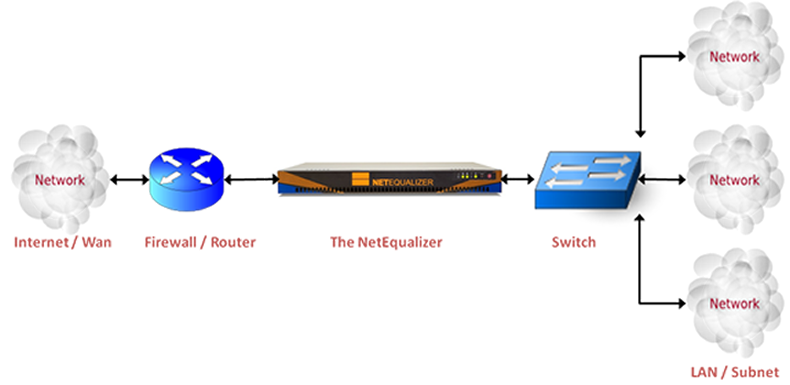
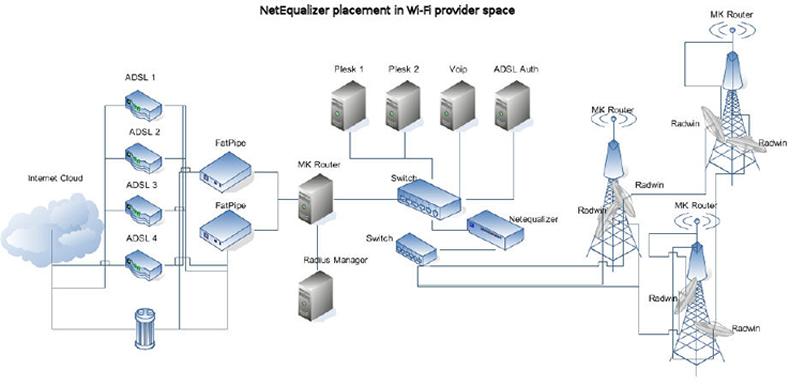
NetEqualizer is an automated traffic shaping appliance that works like putting a traffic cop on a freeway interchange to ensure that everybody gets on and off without creating gridlock. The left turners, the right turners, and the aggressive drivers who would otherwise cut in line behave much better when the traffic officer is there. The router between the Internet and your subnet is just such an interchange, and NetEqualizer is the traffic cop. Internally, NetEqualizer operates similarly to a packet sniffer. It examines Internet data by listening to all traffic on an Internet segment, typically a trunk between a group of users and the Internet. As each Internet packet comes by on the trunk, an arbitrator examines the packet and learns to whom the packet is going—the end user. NetEqualizer keeps a small database of the activity going on over an Internet segment. Then, using a set of predefined rules, it determines which users are consuming excessive bandwidth. During periods of peak network usage, data rates to users who are consuming excessive amounts of bandwidth are imperceptibly slowed as needed to alleviate congestion. NetEq Customer: How does the NetEqualizer differ from other traffic shaping alternatives? (back to top) 1. No Policy Libraries Other technologies force network administrators and operators to build and manage extensive and expensive policy libraries based on application and user groups. NetEqualizer automatically relieves bandwidth congestion with its built-in fairness algorithms, which apply traffic policies based on the behaviors of application types. 2. Bi-directional Traffic Shaping Most of the other tools that we are aware of can only shape or control traffic coming from your network. NetEqualizer shapes bi-directionally, so it influences traffic coming into your network as well as the traffic leaving your network. 3. Cost-Effective NetEqualizer is cost-effective. The appliance listens to traffic on your network and then makes a decision every half second on how to make adjustments to traffic flows. Other tools attempt to adjust dynamically traffic flows with every new packet sensed on your network. The NetEqualizer methodology allows much lower-powered, less expensive hardware to handle very large traffic flows than other alternatives. NetEqualizer does sacrifice a small degree of accuracy to ensure cost-effectiveness. However, since data users are generally more concerned with their “experience” rather than hard network performance numbers, the high price of ensuring extreme accuracy can rarely be cost justified. NetEq Customer: Where should I locate NetEqualizer? (back to top) Locate NetEqualizer between your network and the Internet. Tune the default settings and it will immediately start relieving congestion. This plug-and-play ability is the driving vision and design behind NetEqualizer. Yes, there are “traditional” optional administration features offered, but we cannot overemphasize the importance of the turn key concept. Typical NetEqualizer Installation Typical WiFi NetEqualizer Installation NetEq Customer: Who can benefit from this type of product? (back to top) Any organization that purchases bulk Internet access and redistributes it to a group of users, including corporations, regional service providers, universities, hotels, etc., can benefit from installing a NetEqualizer on their Internet link. NetEq Customer: How does NetEqualizer help ISPs? (back to top) Internet Service Providers (ISPs), like phone companies, rely on the fact that only a small percentage of their customers will be actively using bandwidth at any moment in time and, therefore, most of them have oversold their networks and do not have enough bandwidth to meet peak demands. Economics dictate that regional ISPs who purchase their bandwidth from backbone service providers perform a juggling act between the cost of bandwidth and meeting the service expectations of their customers. Inevitably, some percentage of end users will attempt large downloads. The net result is that all users suffer, even those who are not doing large file transfers. NetEqualizer prevents the majority of users from suffering poor response at the expense of a few heavy users. NetEq Customer: How does NetEqualizer know who is "hogging bandwidth"? (back to top) NetEqualizer keeps track of all active users on your network, including a history of how much bandwidth each user is using, how long they have been using it, and how much of your total network capacity is being used. It then applies “intelligent” rules that take all these factors into account. It will slow down the heaviest users as your network becomes more congested. NetEq Customer: What is unique about NetEqualizer 's throttling mechanism? (back to top) Almost all Internet communications have a client/server model where the client is sending requests and the server is sending data. This is true for ftp transfers, streaming video and streaming audio. Even if the client and server are sending UDP packets, there is always a client/server relationship. The NetEqualizer limits bandwidth by looking at the large user(s) of bandwidth and slowing requests from the client. We believe that the slowing or delaying of client requests is a much better way to throttle the data back than slowing or queuing the data coming from the server. This is radically different from the methods employed by WFQ, TOS and other packet shaping tools. It is the only method that allows you some actual control over Internet traffic coming into your network. The biggest advantage to slowing down client requests is that you get at the source of traffic problems without employing expensive and complex queuing algorithms. NetEq Customer: Does NetEqualizer cause any delay in a network? (back to top) The NetEqualizer is a transparent bridge, allowing you to insert it into any segment of an Ethernet network without adversely affecting Ethernet packet transmission. NetEq Customer: We sell bandwidth in service increments, so some users get 128kbs, others get 256kbs, and our premium users get 512kbs service. Can we provide these kinds of service levels and have them enforced with NetEqualizer? (back to top) Yes, you can enforce service levels with the NetEqualizer. NetEqualizer allows you to set bandwidth rate limits on individual users, subnets, MAC addresses, or VLANs, so that you can effectively manage a tiered service structure. Alternatively, you can set up shared rate limits for different classes of users utilizing NetEqualizer's "Pools" feature. Our User Guide describes your rate limit options in detail. NetEq Customer: What can we do during peak traffic usage? Business needs necessitate that we oversubscribe our bandwidth capabilities. Most of the time we can deliver quality service, but occasionally our trunk gets overloaded. (back to top) NetEqualizer has a safety valve that watches over your network called the "default rules". The default rules are activated when your trunk becomes 85 percent utilized (this parameter is adjustable to meet your needs). When the default rules kick in at 85%, your heaviest bandwidth users are incrementally slowed, so as to not impact your other users. This safety valve is unique to NetEqualizer. AP Connections’ customers report that complaints of slow network speeds drop dramatically following installation of the product and implementation of the congestion safety valve. NetEq Customer: If the default rules slow some users, then how do they help eliminate customer complaints during busy conditions? Aren’t some customers still unhappy? (back to top) When our safety valve kicks in, it typically does not affect the types of activities that users notice. Latency-sensitive activities such as e-mail, chat, music streams, Web browsing and voice streams (VoIP) are generally not heavy bandwidth users and are left untouched. These activities get priority, while users downloading large files are slowed. Improvement to your service quality is immediate and you greatly reduce busy hour complaints. NetEq Customer: What happens if NetEqualizer fails, will our network go down? (back to top) NetEqualizer takes advantage of a mature feature already built into the Linux operating system called STP (spanning tree protocol). Two NetEqualizers placed in parallel will automatically set up a master/slave relationship where one server will back the other in an active/passive mode. NetEqualizer comes pre-configured to take advantage of this feature. If you are interested in keeping bandwidth shaping in place at all times, we recommend purchasing two NetEqualizer and putting them in parallel. NetEq Customer: What is the Penalty_Unit? (back to top) The PENALTY_UNIT is the amount of delay an IP packet gets. So the actual packets get put in a queue and must wait that long to pop out. The units are 100ths of seconds. The variable ANCIENT is the minimum time the NetEqualizer will continue to delay packets between a connection. So if user A is downloading from server B and they exceed the "threshold" based on our internal algorithms, we would start delaying each packet (in both directions) between user A and server B in two queues, one for each direction. We continue this for a minimum time (ANCIENT) which is in seconds. We do this in both directions, "bi-directional shaping", as we find that delaying the "client" requests tends to smoothly slow the server sending. NetEq Customer: What is the Power Requirement for a NetEqualizer unit? (back to top) Power Requirements are listed in our Data Sheets. You can view Data Sheets for any of our NetEqualizer product series by clicking on the links on our NetEqualizer Product Page. NetEq Customer: What are the shipping weights and sizes for a NetEqualizer unit? (back to top) Shipping weights are listed in our Data Sheets. You can view Data Sheets for any of our NetEqualizer product series by clicking on the links on our NetEqualizer Product Page. For more support related questions and answers please visit the NetEqualizer Blog Support Page.
For failover without full-redundancy, there are also network switches on the market that will allow you to use STP to take over if the NetEqualizer ever failed. We offer a third-party switch as a failover option. Request our Price List for pricing and to review our detailed specification on this switch.
